Specify conditions and move files/folders
Copy/Move files/folders that meet the conditions
By combining the "Search in the specified folder" action with the "Copy/Move/Rename the file or folder" action, you can copy/move only files that match certain conditions.
Generate the list of files/folders that match the particular conditions by the "Search in the specified folder" action.
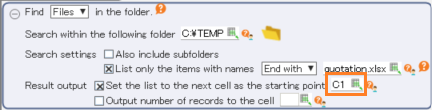
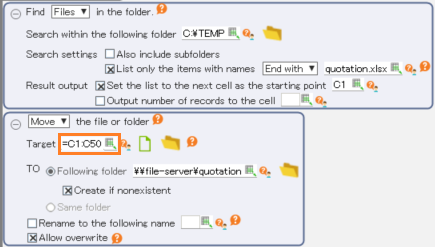
Set the cell range of the list generated in step 1. to the operation target of "Copy/Move/Rename the file or folder" action.
Note
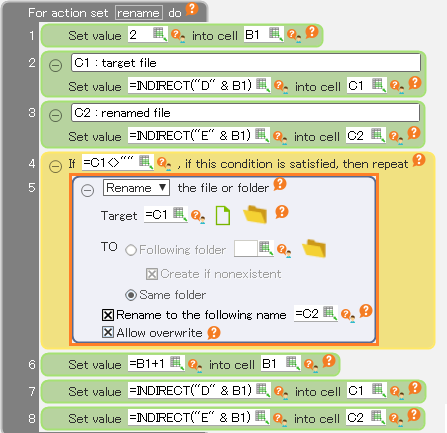
If you specify a cell range to the operation target, the setting of "Rename to following name" will be ignored. If you also want to change the name, use the repeat action to process one file at a time. See "Rename multiple files/folders" for details.
Rename multiple files/folders
If you specify a cell range to operation target of "Rename", nothing will occur.
So if you want to rename multiple files or folders, use the repeat action.
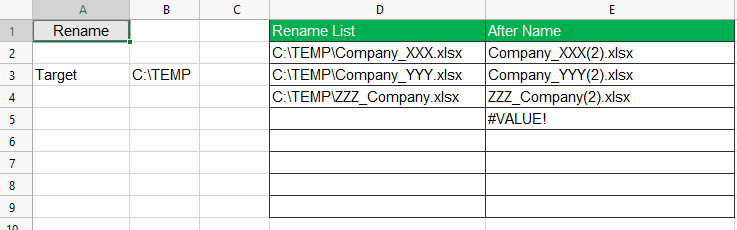
Make a list of files to be renamed and their new names on the sheet.
Tip
You can also make the list with the "Search in the specified folder" action like "Copy/Move files/folders that meet the conditions".
Tip
Here, a function is used to create the the new name in column E.
Set the "Repeat if ○○ is fulfilled" action to process the list one row at a time.
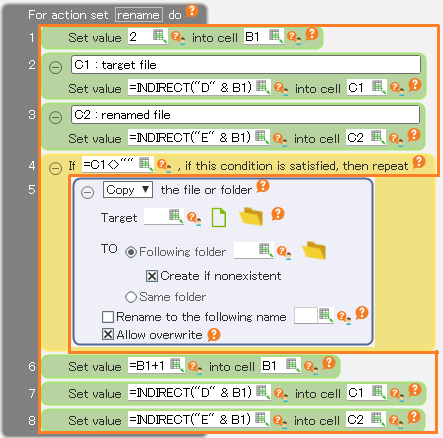
Rename with the "Copy/Move/Rename the file or folder" action.