Set data in Excel file to cell
You can use the action to read the data in the Excel file and set it in the CELF sheet.
Set data in Excel file to cell
- Open 'Action set setting' dialog.
- Drag 'Set data in Excel file to cell' action in 'File operation' tab, and then set into edit area.
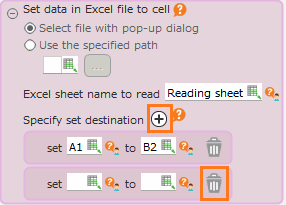
- Select the Excel file specification method for reading data.
- If you select file by popup at action set execution, select 'Select file with pop-up dialog'.
- If you select file with full path, select 'Use the specified path'.
- Specify the name of the sheet from which data is to be read in 'Excel sheet name to read'.
- In 'Where to set the data', specify the start cell to be set in the CELF sheet and the cell range to read Excel.
Tip
- You can make multiple designations by clicking the '+' button, and you can delete unnecessary 'Where to set the data' by clicking the 'trash can' button.
- Click 'OK' button.
Attention
This action is not available for the following Excel files.
- Not readable
- Password is set
Tip
This action may behave differently depending on the version of CELF. For more details, please refer to Pasting in Actions.
Related keywords
import, input, cooperation, excel