Exporting action set setting information
Here is how to export the setting information of an action set.
The exported file will also contain the content and comments specified in the action.
Therefore, it is possible to search for areas in the action set that use specific values or refer to specific cells, and so on.
Attention
Exported files cannot be used for importing.
Exporting action set setting information
- Open Application management tab in "Manage" screen.
- Right click on the sheet and select "Export" -> "Setting information of action set" menu.
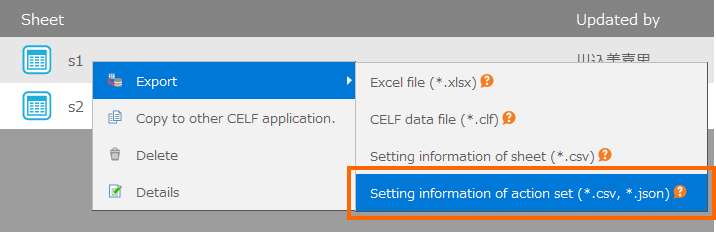
Tip
Action set setting information can also be exported after multiple sheets are selected. In this case, one file of action set setting information will be exported for each sheet.
- In the Output setting information of action set screen, specify the output destination and file format, and click the Output button.
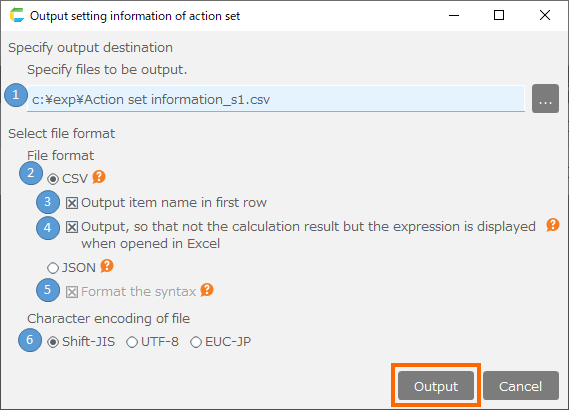
[1] Output destination
If a single sheet is selected, specify the output file path.
If multiple sheets are selected, specify the output destination folder.
In this case, action set setting information for each sheet will be output as a file named "Action set information_[sheet name].csv" or "Action set information_[sheet name].json" according to the selected file format.
[2] File format
Specify the format of the file to be exported, either CSV or JSON.
[3] Output item name in the first row.
If checked, the item name will be output on the first row of the export file.
[4] Output, so that not the calculation result but the expression is displayed when opened in Excel
If the value input in the action item is an formula starting with "=", the formula will be evaluated and the result will be displayed when opened in Excel.
If checked, the formula will be output with an additional "'" at the beginning, and the formula will be displayed even when opened in Excel.
[5] Formatting the syntax
Format the output JSON so that it is easy to read using line breaks and indentation.
If unchecked, the output will be on a single line without spaces or line feeds, thus reducing file size.
[6] Character encodings for file
Specifies the character encoding of the exported file.
Tip
Select application(s) to export action set setting information.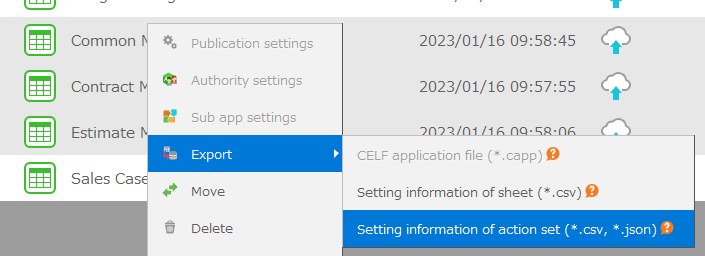 If an application is selected, the export will be executed for all sheets contained in the selected application.When exporting, a folder with the application name is created in the destination folder, and a file named "Action set information_[sheet name].csv" or "Action set information_[sheet name].json" is output in that folder.
About exported files
Exported file will contain the contents of all action sets created in the sheet.
When outputting the contents of an action set, the method of activating the action set (button, value change, etc.) will also be output.
Output for each action is as follows.
Item name Output contents Sheet Sheet name Action set Action set name Step Step number in the action set Hierarchy Depth of nesting of actions Item number The step number of the parent action, concatenated with the sequential number in it Action name Action name Parameter name Name of the action item Value The value specified for the action item. Attention
- For actions that do not support the export function with extension options, etc., the value will be printed as "This action does not support the output of action information" and the value specified by the item in that action will not be printed.
- Characters that cannot be represented by the selected character encoding will be converted to "?" for output.
- No information about tags will be output in the exported information.