Navigation
next
previous
|
CELF Help 4.11-0.2
»
»
»
連動式リストボックス(ドリルダウン)

複数のリストコントロールを連動する

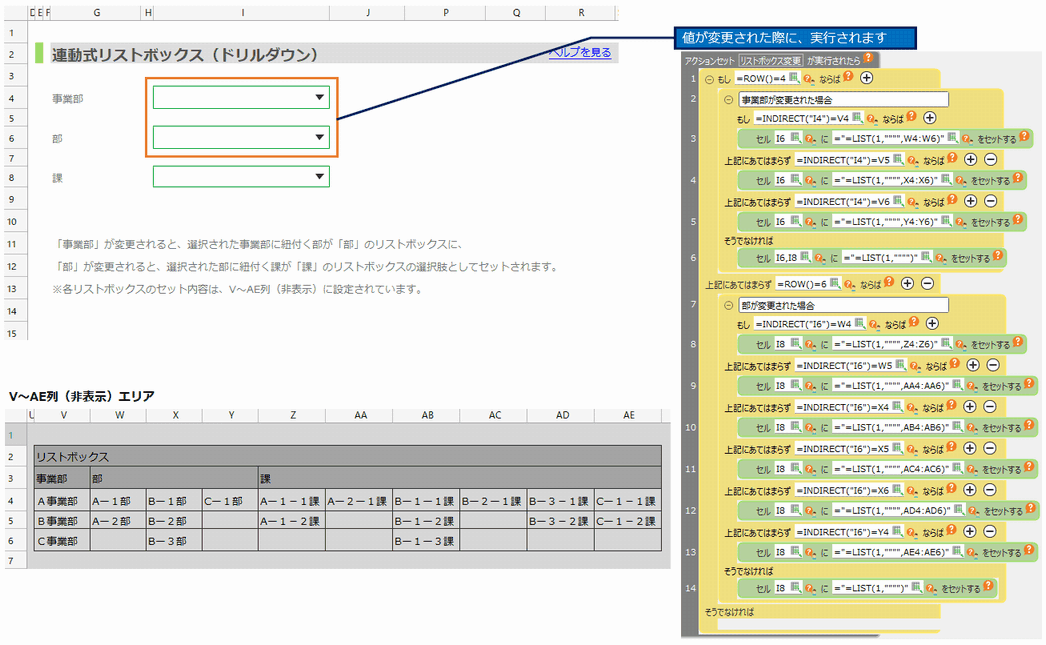
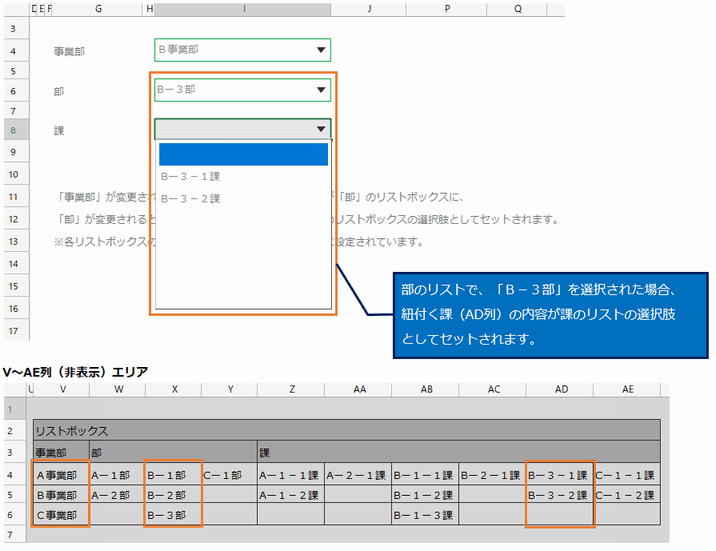
複数あるリストコントロールを連動させます。
サンプルでは、選択された事業部に紐付く部を、部に紐付く課を、
リストコントロールの選択肢としてセットします。
実行前
実行後
Search
▶CELF Community
Table Of Contents
Login
StartUp(5 minutes cooking)
Table Management
Create application
Create Sheet
Create Action
Using Action
Test run
Publish/Unpublish
Create app from Excel file
How to customize your app
Workflow
Create a Web App (CELF BrowserAccess)
Use Web APIs
CELF AI
External connection/core system collaboration
Small technic/Reverse dictionary
Various Registrations, Settings and Referrences
SQL Action (Extension option)
Workflow (Extension option)
UI Component (Extension option)
About Tayoreru CELFLite
Accounting software peripheral business application template
Others
Related sites and Various documents
コントロールを動的に作成
カレンダーの初期表示を自動で今日にする
カレンダーと未入力を両立する
テーブルの内容をリストにする
連動式リストボックス(ドリルダウン)
各種グラフ
Contact Us
Frequently asked questions
Contact Us
Navigation
next
previous
|
CELF Help 4.11-0.2
»
»
»