Create Table
Create Table
- Click 'Table management' button in "Manage" screen, and then 'Table management' view is opened.
- Select 'CELF database (default)' as 'Database to connect to', and then click '+New Table' button in 'Table management' view.
Tip
Table can be created just in 'CELF database (default)'.
Set Table Name And Colmn Name
- Set each field in 'Create table'.
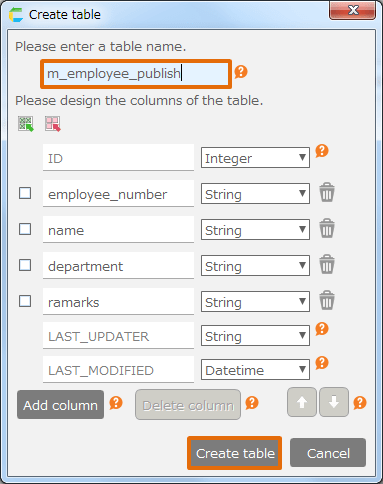
[1] Table name
Input table name. The name must be unique in the target database.[2] Column name
Input column name. The name must be unique in this table.[3] Column type
Select column type from drop down next to column name. Available column types and acceptable values are listed below.
Type Acceptable value Character Characters up to 65,535 bytes in UTF 8 encoding(※1) Integer An integer in the range of -9,223,372,036,854,775,808 - +9,223,372,036,854,775,807 number(with decimal) Number in the range of -1.7976931348623157E+308 - -2.2250738585072014E-308, 0, 2.2250738585072014E-308 - 1.7976931348623157E+308(※2) Date Date in the range of 1000-01-01 - 9999-12-31 Time Date and time in the range of 1000-01-01 00:00:00 - 9999-12-31 23:59:59 Attention
- ※1 Unicode supplementary characters can not be stored.
- ※2 Because it is stored as a floating point number, errors may occur.
※(on-premises version only) Customers using CELF 3.3.0 or higher and MySQL 8.0 as the database have no restrictions on ※1.
Tip
CELF can define column type as following.
Type Column type in database Character TEXT Integer BIGINT number(with decimal) DOUBLE Date DATE Time DATETIME Refer the detail of MySQL reference manual.
[4] Add column
Click 'Add column' button.[5] Delete column
Click the ‘Trash’ button next to the drop down. If you want to delete more than 1 column, select the checkbox next to the column name and then click 'Delete' button.[6] Move Column position
Select the checkbox next to the column name, then click ↑ or ↓ button to move the column to the new position.Tip
'Delete' button and move direction (↑or↓) button is disabled if the columns are not checked.
※If connected database is CELF database, below columns are prepared in advance. These columns are not allowed to change, because these are commonly used within all tables in the database.
Column name Details ID Available column as unique in the table (number adopted automatically after data registration) LAST_UPDATER Column to set ID of last update PIC in the record (updated automatically as soon as updated data) LAST_MODIFIED Column to set ID of last update date and time in the record (updated automatically as soon as updated data)
Attention
- The rule of table name and column name is along with MySQL basically.
- Available character:[0-9,a-z,A-Z$_] and U+0080 ..U+FFFF in Unicode
- 64 byte or less than it in UTF-8
- It is not allowed to create table and column name just with number.
- It is not allowed to create table and column name with reserved name by MySQL.
- You cannot create a table with uppercase letters. Even if you enter an uppercase letter in the table name in the Create Table, it will be created by converting it to lowercase.
- The table name starting from 'sys_' is not allowed to create because they are CELF system tables.
- Click 'Create table' button.
See also
You can change created table definition later. Regarding table definition, refer Modify Table.
