What you can do with Web APIs
What are Web APIs
Web APIs are APIs that allows apps to communicate with each other over the Web. CELF allows apps to retrieve and/or register data by using Web APIs for user-defined tables. By using Web APIs, it is possible to link with other systems and services, and to create your own applications using CELF tables.
Tip
- If you have a CELFAI license, you can publish knowledge.
How to use Web APIs
In CELF, an API key is used as authentication information to use Web APIs. Only one API key can be created per Company ID. To use Web APIs in CELF, a user with system administrator privileges need to perform the following steps.
Tip
- Please keep your API key confidential to prevent it from being known to third parties. This can lead to the risk of unauthorized access.
- Log in to CELF and open the 'API Management' tab on the Manage screen.
- Under "API Key Settings", click the '+Create new API key' button. After creation, you can copy the created API key to the clipboard by clicking the 'Copy' button.
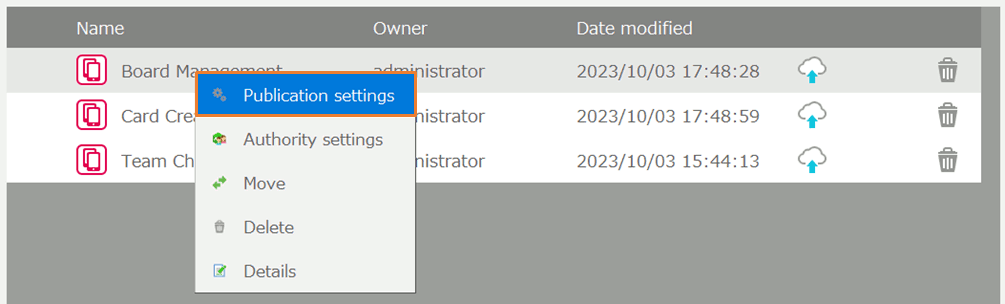
- In the table publication settings, click the 'Publish' button to publish the tables you want to use with Web APIs. You can also change API name, which is part of the URL for a Web API, by clicking the 'Edit' button.
Tip
The tables that can be published are tables created by users in CELF and the CELF management tables 'sys_user', 'sys_group', 'sys_operation_log'.
The available Web APIs that CELF management tables can use are limited.
When using CELF AI, in addition to table publication settings, you can also configure publication settings for the knowledge you have created.

- For more information about CELF AI, please refer to CELF AI.
- For more information on how to create knowledge, please refer to Creating new knowledge.
- In a web app that uses Web API, the following will be added to the request header to call the Web APIs.
X-CELF-API-KEY: {The created API key}Tip
- We also plan to support the use of Web APIs via OAuth.
Usage restrictions of WebAPI
When calling WebAPIs, the following restrictions are applied according to number of users of a CompanyID.
Number of users Number of Requests/Day Data Traffic/Day Number of Requests/5 minutes Data Traffic/5 minutes Number of Records/Request Under 100 60,000 12GB 1,500 300MB 10,000 101 to 200 120,000 24GB 3,000 600MB same as above 201 to 300 180,000 36GB 4,500 900MB same as above 301 to 400 240,000 48GB 6,000 1,200MB same as above Over 401 +60,000 per 100 users +12GB per 100 users +1,000 per 100 users +300MB per 100 users same as above Tip
- An HTTP 403 Forbidden error will be responded if a daily restriction is exceeded.
- An HTTP 429 Too Many Requests will be responded if a 5-minute restriction is exceeded.
- If the 10,000 record limit is exceeded, the request will be treated as if it were requesting 10,000 records.
- Paid options to change the restrictions will be available in the future.