Knowledge
'Knowledge' is a feature that allows your data to be automatically used by Generative AI actions.
By importing data into knowledge in advance, the Generative AI action automatically searches for data related to the request processing and generates response.
This enables the execution of more specialized tasks based on your company’s proprietary data.
Composition of Knowledge
The Knowledge feature is mainly composed of the following elements.
Knowledge
This is the storage location for data used by Generative AI actions.
You can manage by naming it according to its purpose (e.g., 'Product Master', 'FAQ', etc.).
Data source
This is the source for importing data to be saved in Knowledge.
In the current version, tables can be registered as data sources.
The latest content of the data source is reflected in the Knowledge by registering a data source in Knowledge and performing 'Data import'.
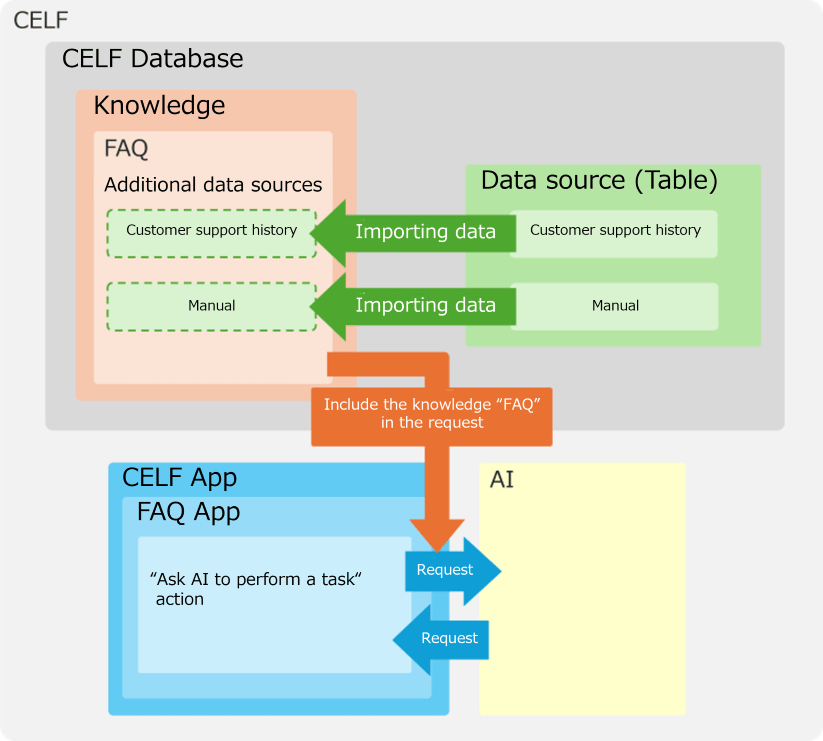
Basic Flow of Using Knowledge
The basic flow from Knowledge creation to executing a Generative AI action using that Knowledge is as follows.
- Create a Knowledge. (See Create new Knowledge)
- Add a data source to the Knowledge. (See Add a data source)
- Import data into the Knowledge. (See ③ Data import in Knowledge management screen)
- Set to include the Knowledge when editing the 'Make a request to the AI' action. (See How to Use Generative AI Actions)
- Execute the action.
When 5 is executed, the Generative AI action access the Knowledge to find data related to the request content.
Then, it will set the retrieved data and the original request content together to request the AI for processing.
Tip
- Besides actions, the functionality is available as a Web API for referencing knowledge. For details on the Knowledge Reference Web API, please refer to Specify search conditions for knowledge and reference knowledge information.
When to use Knowledge
The data that can be used in the 'Make a request to the AI' action includes 'Knowledge' and 'Sheet data'.
Although they both use table data, each have the following characteristics.
Please use them according to your needs.
- Sheet data
- Suitable for accurate data retrieval that matches keywords or clear specific conditions (e.g., user ID is 'ABC').
- Example: When searching for data without omission under specific conditions such as 'products with more than 100 contracts in a specific period'.
- It is effective for product searches and customer information searches.
- Knowledge
- Suitable for finding highly relevant data based on meaning within a text (searchable if the meaning is close, even if keywords do not match).
- Example: When searching for information not only by keyword but also by semantic similarity, such as 'Tell me about case studies for the introduction of systems similar to customer management'.
- It is effective for extracting relevant answers from FAQ information or searching for related information from internal regulations.